Quantum Gates
Quantum gates are the building blocks of quantum circuits. This guide covers the basic gates available in LeafSheep QVU.
Single-Qubit Only Gates
These gates cannot be used as controlled operations.
Basic Gates
- H (Hadamard): Creates superposition states
- No parameters
- Color: Gold (#FFD700)

- I (Identity): Does nothing to the qubit state
- No parameters
- Color: Light Pink (#FFB6C1)

Phase Gates
- S Gate: Fixed π/2 phase rotation
- No parameters (equivalent to P(π/2))
- Color: Turquoise (#00CED1)

- T Gate: Fixed π/4 phase rotation
- No parameters (equivalent to P(π/4))
- Color: Tomato (#FF6347)

Special Operations
- Reset to |0⟩: Resets qubit to ground state
- No parameters
- Color: Light Gray (#D3D3D3)

Controllable Gates
These gates can be used with control qubits.

Pauli Gates
- X (NOT Gate): Flips the state of a qubit
- No parameters
- Control qubits: Up to maximum qubit number
- Color: Light Green (#98FB98)

- Y Gate: Rotates the state around Y-axis
- No parameters
- Control qubits: Up to 1
- Color: Light Pink (#FFB6C1)

- Z Gate: Adds a phase difference
- No parameters
- Control qubits: Up to 2
- Color: Silver (#B8C0C0)

Rotation Gates
- RX(θ): Rotation around X-axis
- Parameter θ (theta): Value from -2 to 2 (multiplied by π)
- Control qubits: Up to 1
- Color: Yellow (#FFFF00)

- RY(θ): Rotation around Y-axis
- Parameter θ (theta): Value from -2 to 2 (multiplied by π)
- Control qubits: Up to 1
- Color: Yellow (#FFFF00)

- RZ(φ): Rotation around Z-axis
- Parameter φ (phi): Value from -2 to 2 (multiplied by π)
- Control qubits: Up to 1
- Color: Yellow (#FFFF00)

Phase Gates
- P(θ): Phase rotation
- Parameter θ (theta): Value from -2 to 2 (multiplied by π)
- Control qubits: Up to 1
- Color: Light Green (#98FB98)

Universal Gate
- U3(θ,φ,λ): General single-qubit rotation
- Parameter θ (theta): Value from 0 to 1 (multiplied by π)
- Parameter φ (phi): Value from -2 to 2 (multiplied by π)
- Parameter λ (lambda): Value from -2 to 2 (multiplied by π)
- Control qubits: Up to 1
- Color: Bisque (#FFE4C4)

Parameter Panel
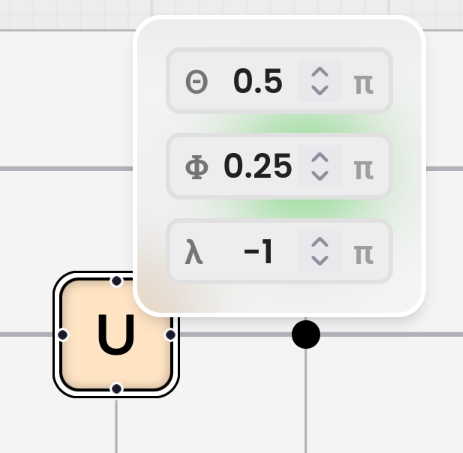
When you select and hover a gate, the parameter panel appears next to the gate:
- Enter values between -2 and 2 (these are multiplied by π)
- Values are multipliers of π (e.g., 0.5 means 0.5π)
Common Parameter Values
Here are some frequently used parameter values:
- 0.5: Means 0.5π (π/2), used in S gates
- 0.25: Means 0.25π (π/4), used in T gates
- 1.0: Means π, full phase rotation
- -0.5: Means -0.5π (-π/2), inverse rotation
note
All angle parameters are multipliers of π. For example:
- Entering 0.5 means 0.5π (or π/2)
- Entering 0.25 means 0.25π (or π/4)
- Entering 1 means π
- Entering -2 means -2π
Tips for Working with Parameters
- Use mathematical expressions for precise values (e.g., "1/2" for π/2)
- Parameters update the circuit in real-time
Using Gates in LeafSheep QVU
- Select a gate from the left panel
- Drag it onto your circuit
Example: Creating a CNOT Gate
- Add an X gate to your circuit
- Hover over the X gate to reveal control points
- Click and drag from the control point to another qubit
- The X gate is now controlled by the other qubit (CNOT)
